Hermes Agent Setup Guide
Hermes Agent is Nous Research's open-source terminal agent: it chats, runs commands, reads and writes files, uses web and media tools, and keeps long-term memory. This guide installs it and connects it to JZS Token.
What you need
| Field | Value | Notes |
|---|---|---|
| Provider | Custom endpoint / OpenAI compatible | The wording differs between versions; pick the one that lets you type a URL. |
| Base URL | https://jzstoken.com/api/v1 | If verification fails on an older version, try https://jzstoken.com. |
| API Key | sk-… | The terminal hides it while you paste. That is normal. |
| Model | gpt-5.6-terra | Or any model from the catalog. |
1. Install Hermes
| System | Method | Command / notes |
|---|---|---|
| Windows / macOS (desktop users) | Hermes Desktop | Download the desktop installer from the Hermes site. The easiest path. |
| Linux / macOS / WSL2 / Termux | Install script | curl -fsSL https://hermes-agent.nousresearch.com/install.sh | bash |
| Windows PowerShell | Install script | iex (irm https://hermes-agent.nousresearch.com/install.ps1) |
| Windows (most reliable) | WSL2 + Ubuntu | Use this if the native Windows install gives you trouble. Steps below. |
Windows: set up WSL2 first
Open PowerShell as administrator and run:
wsl --install
If it hangs at 0%, use the web download instead:
wsl --install --web-download -d Ubuntu
Restart when asked, open Ubuntu from the Start menu, and create a Linux username and password. Check it worked with wsl --version.
Install Git and Hermes (WSL2 / Ubuntu / Linux)
sudo apt update
sudo apt install git -y
curl -fsSL https://hermes-agent.nousresearch.com/install.sh | bash
source ~/.bashrc
hermes version
hermes doctor
The update command is hermes update.
2. Connect JZS Token with hermes setup
- Run
hermes setupin the terminal where Hermes is installed. - Choose quick setup or model setup.
- At Select provider, choose More providers…, then Custom endpoint (enter URL manually).
- At API base URL, enter
https://jzstoken.com/api/v1. - Paste your API key and press Enter. Nothing shows while you paste.
- Hermes verifies the endpoint and lists the models your key can use. Type the number for
gpt-5.6-terraor another model. - If it asks for a context length, start with
32000. Raise it once everything works. - At Connect a messaging platform?, choose Skip for now.
- At Launch hermes chat now?, type
Y.
Or: add it with CC Switch
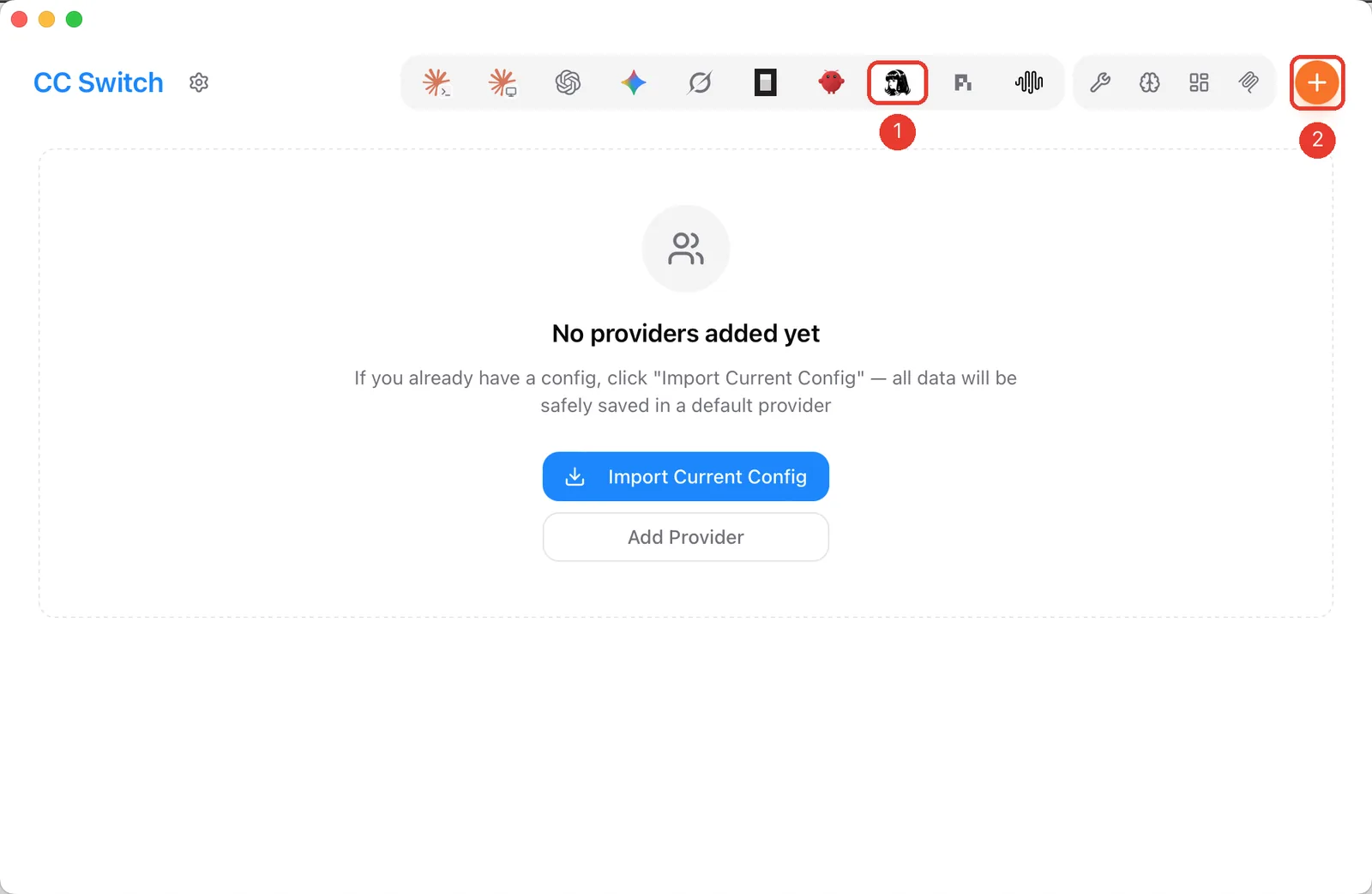
CC Switch can write Hermes' ~/.hermes/config.yaml for you. Select the Hermes icon (1) and click + (2), keeping Custom Configuration.
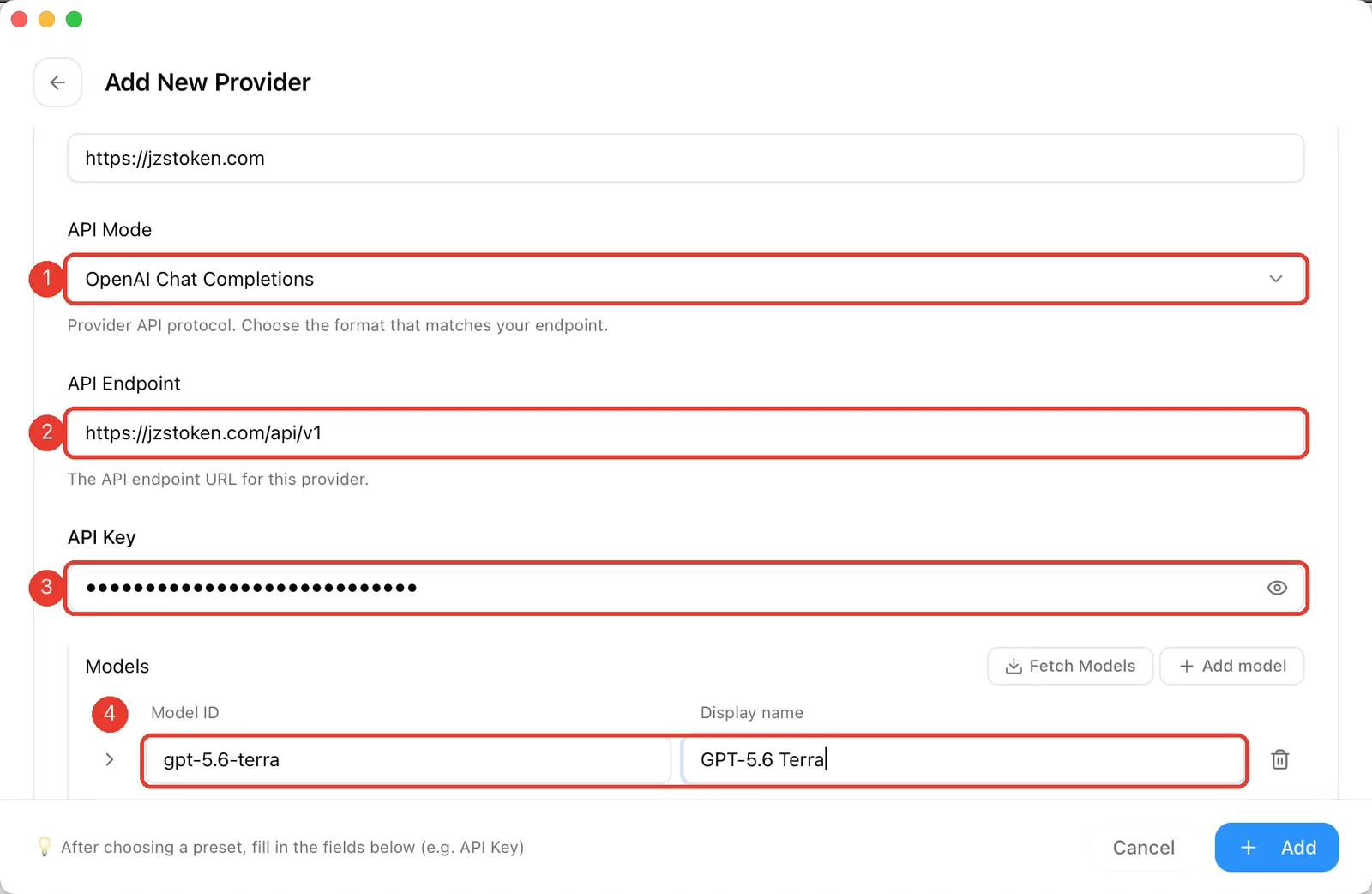
Set Provider Key to jzstoken and Provider Name to JZS Token, then:
- API Mode:
OpenAI Chat Completions. - API Endpoint:
https://jzstoken.com/api/v1. - API Key: your key.
- Models: click Add model and enter
gpt-5.6-terra. The first model becomes Hermes' default.
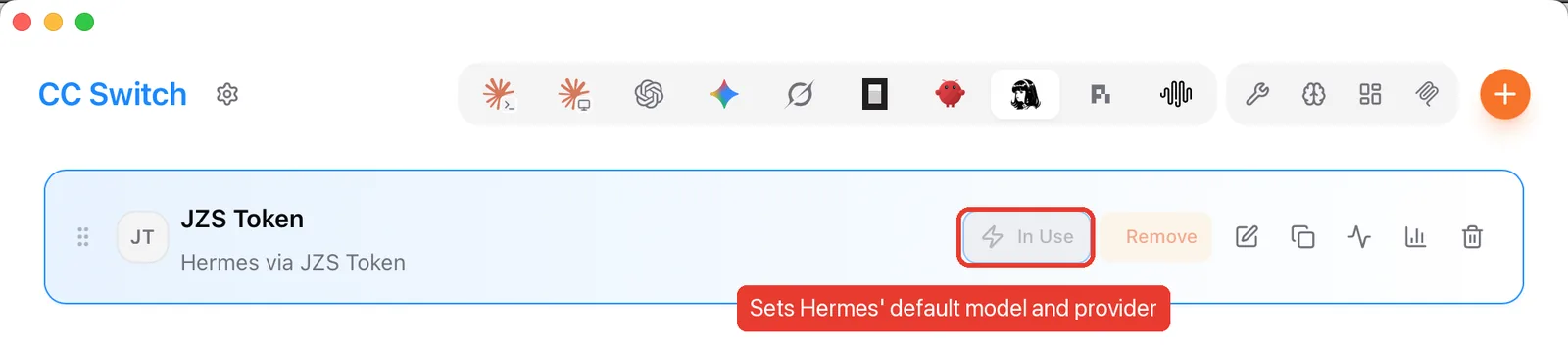
Click Add, then Enable on the card. It switches to In Use and Hermes uses JZS Token the next time it starts.
The resulting config.yaml, if you prefer to write it yourself:
custom_providers:
- name: jzstoken
  base_url: https://jzstoken.com/api/v1
  api_key: sk-your-key-here
  models:
    gpt-5.6-terra:
      name: GPT-5.6 Terra
model:
  default: gpt-5.6-terra
  provider: jzstoken
3. Chat, gateways and everyday commands
| Command | What it does | |
|---|---|---|
hermes | Start chatting. | |
hermes setup | Run the full setup wizard again. | |
hermes model | Switch model or provider. | |
hermes doctor | Check dependencies, config and services. | |
hermes update | Update Hermes. | |
hermes --continue | Resume your last session. | |
hermes gateway | Start the messaging gateway. | hermes gateway status checks it. |
Troubleshooting
| Problem | Fix | |
|---|---|---|
hermes: command not found | Run source ~/.bashrc or open a new terminal. | Still missing? Check your PATH. |
| Model verification fails | Check URL, key and model ID. Use https://jzstoken.com/api/v1 first. | Older versions may want https://jzstoken.com. |
| Replies cut off, context too small | Raise the context length in hermes setup or the config. | Start low, then increase. |
| WSL2 cannot reach a Windows service on localhost | Windows 11: enable mirrored networking (below). | Windows 10: use the WSL default gateway IP instead of localhost. |
| Config missing after an update | hermes config check, then hermes config migrate. |
Mirrored networking: add this to %USERPROFILE%\.wslconfig, then run wsl --shutdown.
[wsl2]
networkingMode=mirrored