OpenClaw Setup Guide
Add JZS Token as a custom model provider in OpenClaw. Use CC Switch, the built-in onboarding wizard, or paste the config file below. All three produce the same result.
What you need
https://jzstoken.com/api/v1/chat/completions or /messages.openai-completions or anthropic-messagesOption 1: CC Switch
1. Open the OpenClaw tab and click +
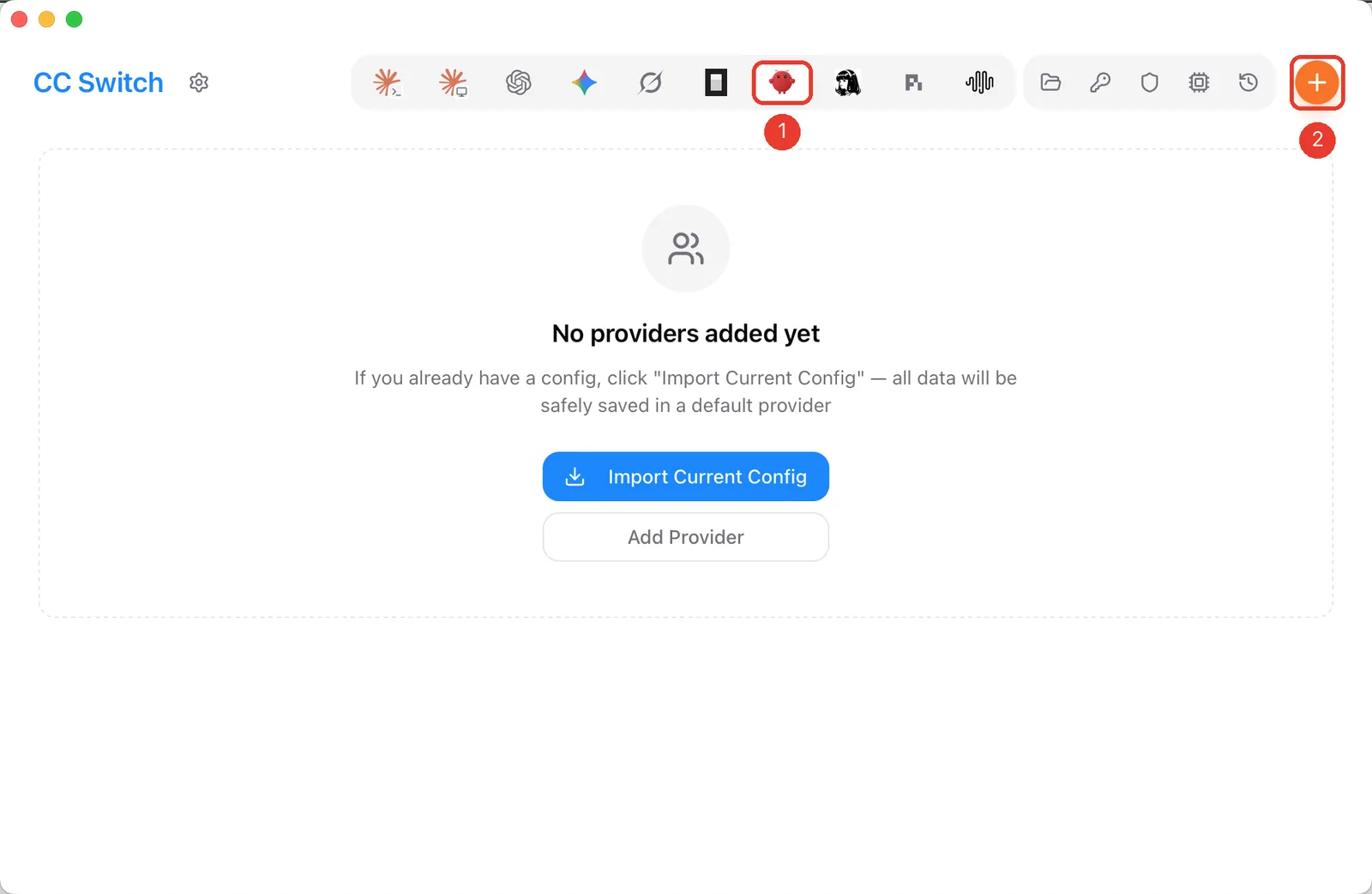
2. Provider details
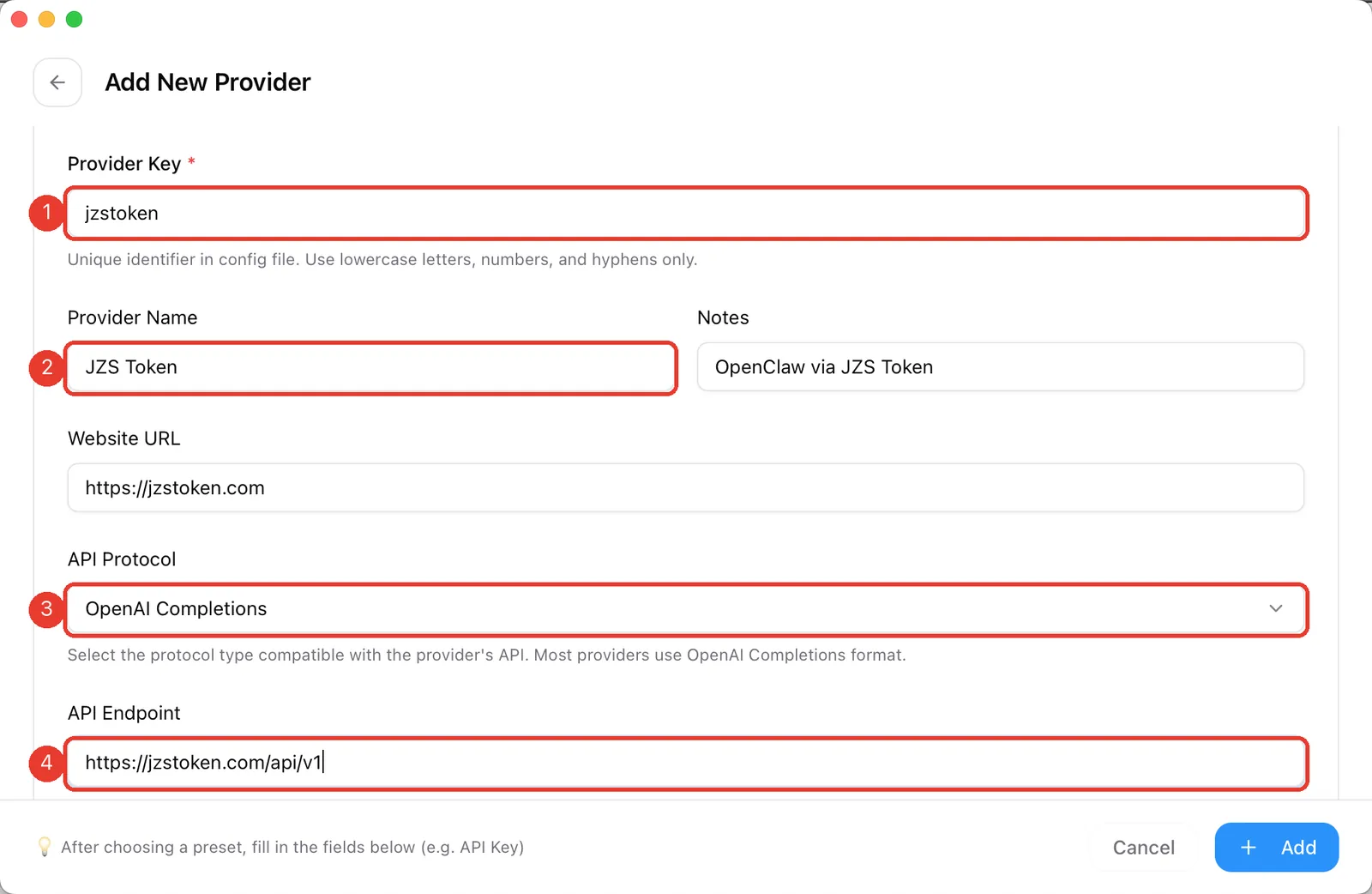
- Provider Key:
jzstoken. You will refer to models asjzstoken/<model-id>. - Provider Name:
JZS Token. - API Protocol: see the next step.
- API Endpoint:
https://jzstoken.com/api/v1.
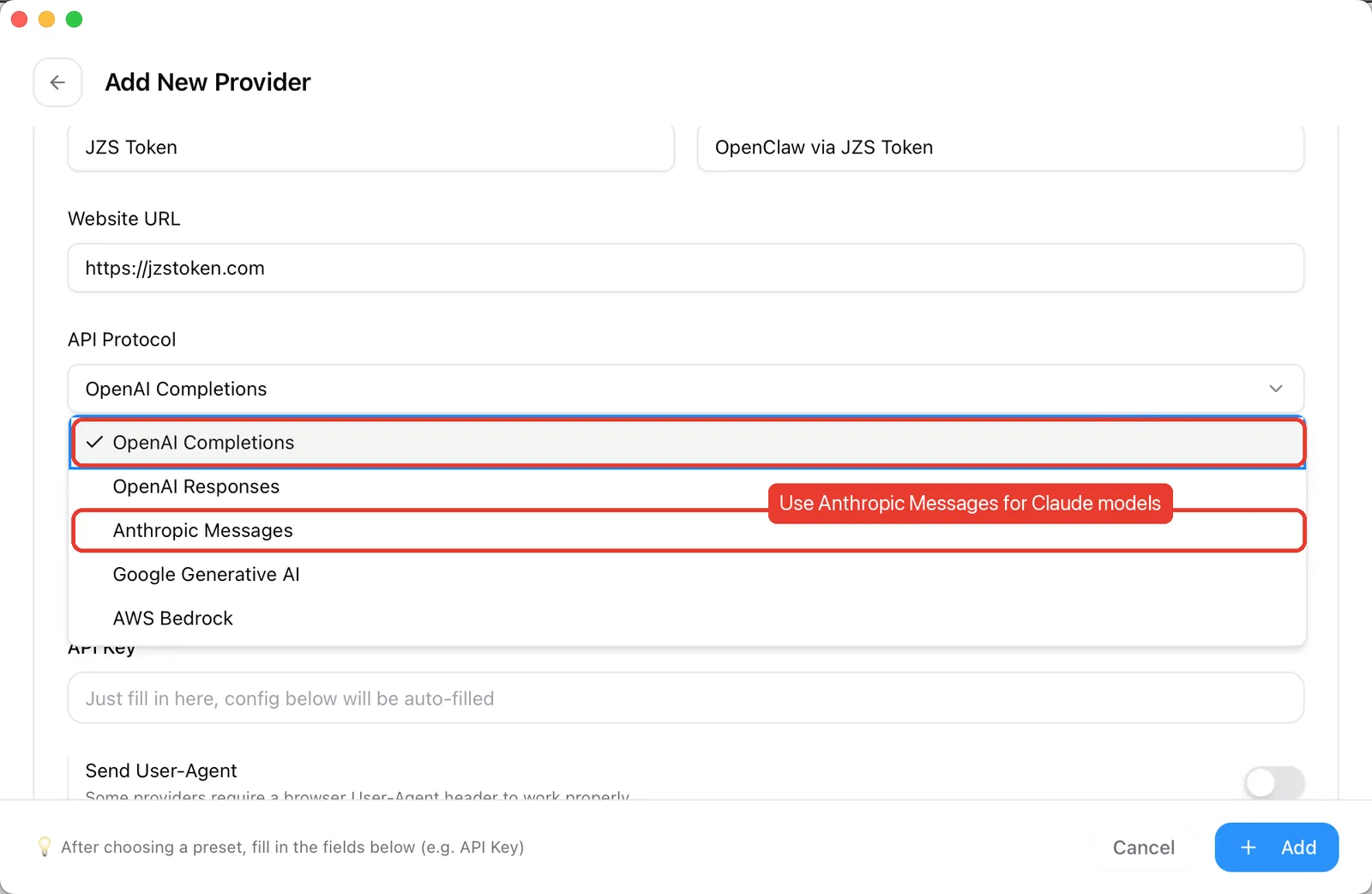
3. Pick the protocol
OpenAI Completions works for GPT, DeepSeek, Qwen, GLM, Kimi, MiniMax and most other models. For Claude models, including jzs-max-3.0, choose Anthropic Messages. If you want both, add two providers (for example jzstoken and jzstoken-claude).
4. API key and models
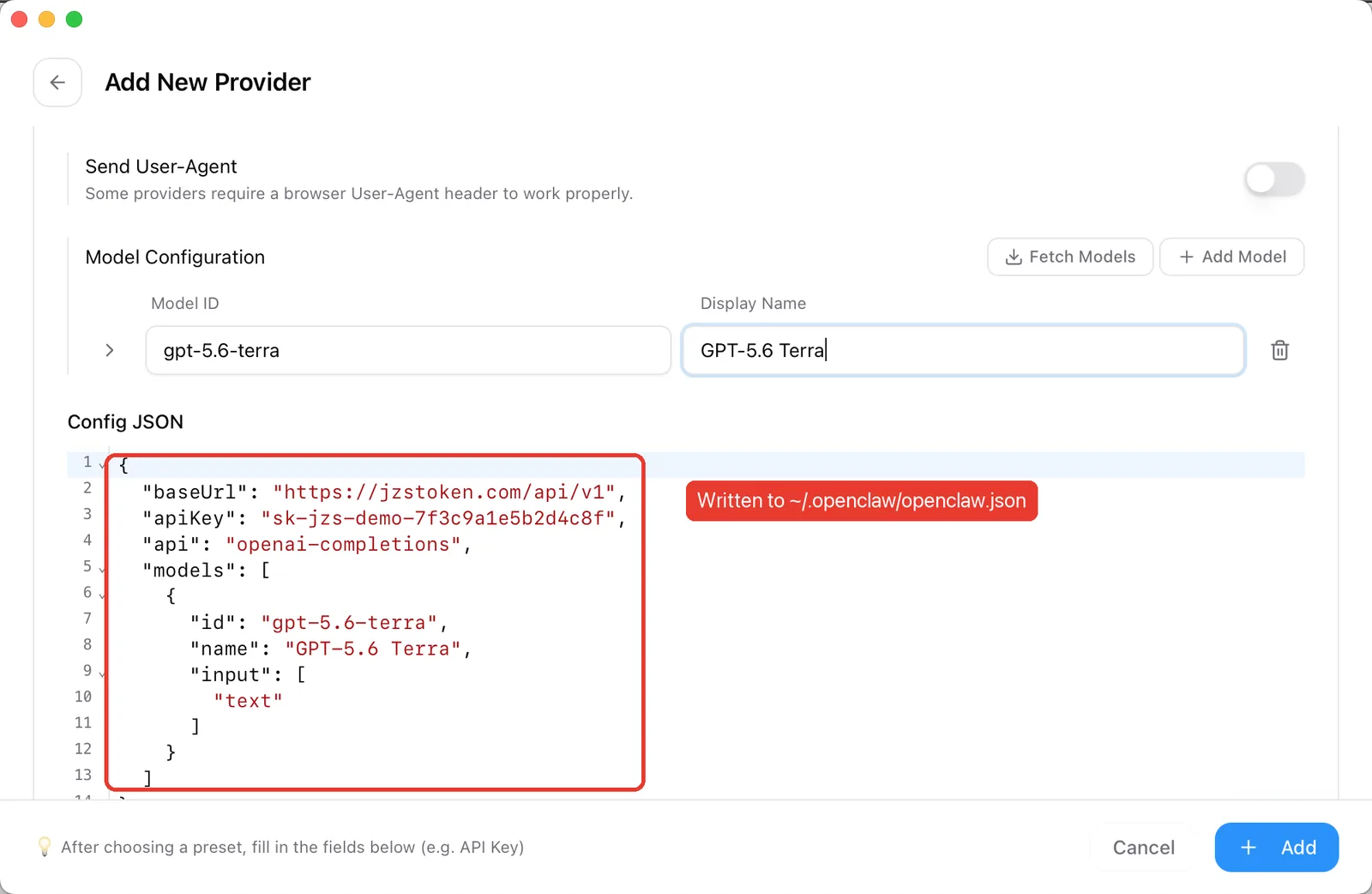
Paste your key (1). Under Model Configuration, click Add Model and enter the Model ID and a display name (2). Add one row per model.
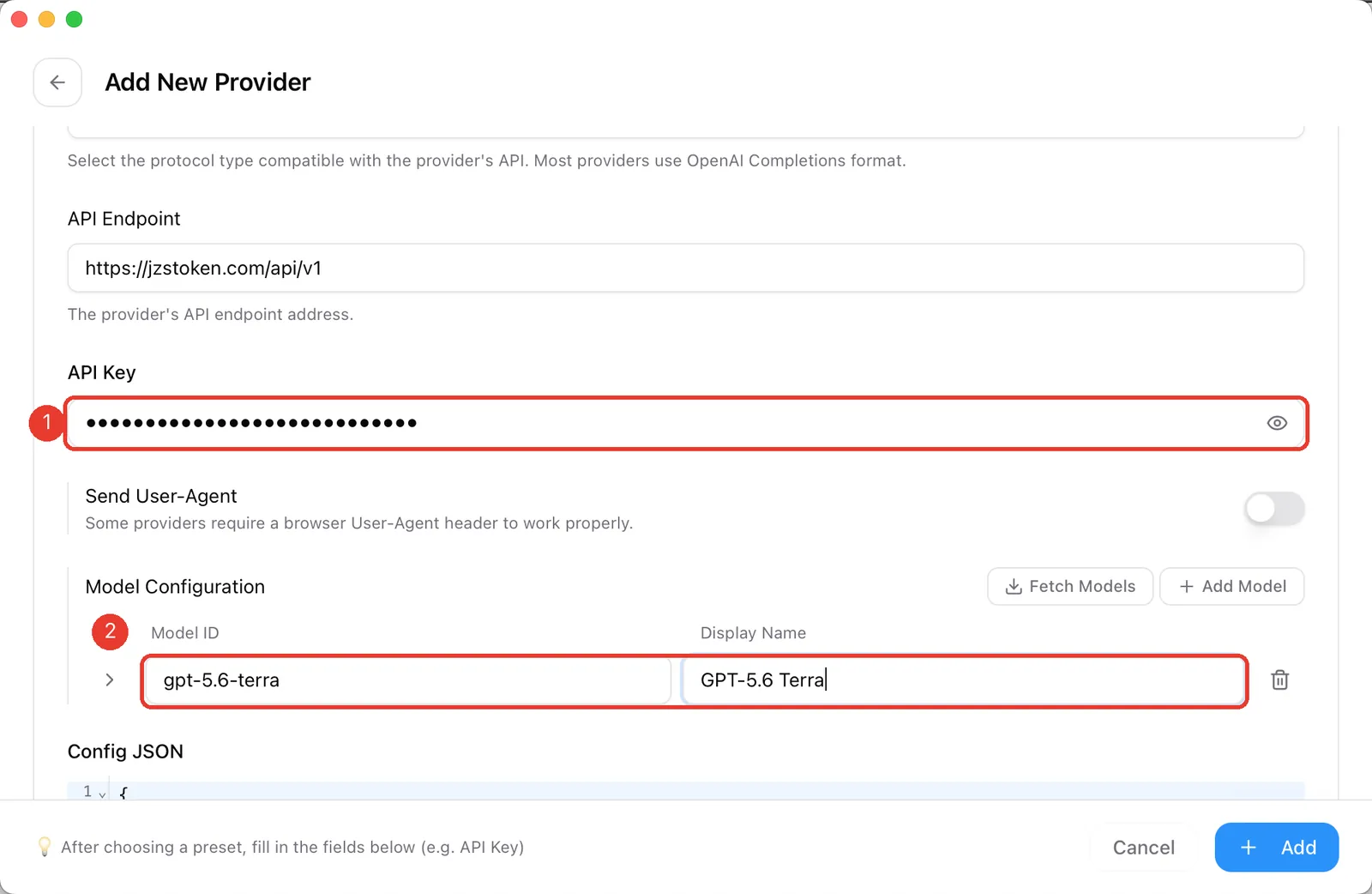
The Config JSON preview shows what will be written. It is the same block as in Option 3. Click Add.
5. Make it the default
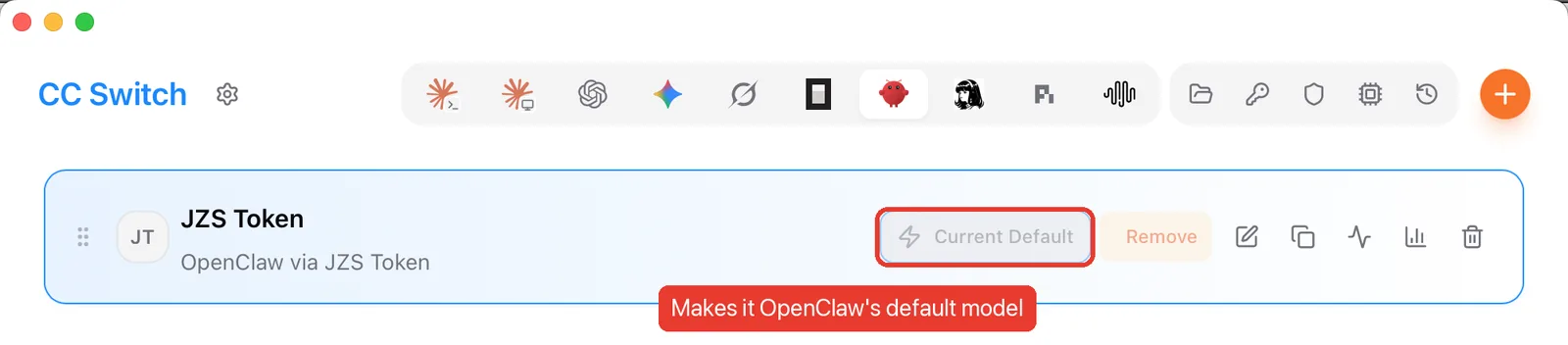
Click Add on the provider card, then Set Default. That sets OpenClaw's primary model to jzstoken/gpt-5.6-terra. The button then reads Current Default.
Option 2: the onboarding wizard
Works in any terminal: Linux, macOS, Windows or a cloud server.
- Run
openclaw onboard. - At the security notice (single-user by default), choose Yes.
- For Onboarding mode, choose QuickStart. You can fine-tune later with
openclaw configure. - For Model/auth provider, scroll down to Custom Provider (any OpenAI- or Anthropic-compatible endpoint).
- API Base URL:
https://jzstoken.com/api/v1. Mind thehttps. - Endpoint compatibility:
- Anthropic-compatible for Claude models such as
jzs-max-3.0(recommended). - OpenAI-compatible for everything else.
- Unknown lets OpenClaw probe both; use it if you are unsure.
- Anthropic-compatible for Claude models such as
- Choose Paste API key now and paste your key.
- Model ID: for example
jzs-max-3.0with Anthropic-compatible, orgpt-5.6-terrawith OpenAI-compatible. - Wait for Verification successful, give the endpoint an ID (for example
jzstoken), and press Enter through the optional alias.
Option 3: paste the config (JSON5)
OpenClaw keeps its settings in ~/.openclaw/openclaw.json (JSON5, so comments and unquoted keys are fine). Merge one of these into the file.
OpenAI-compatible models
{
  models: {
    mode: "merge",
    providers: {
      jzstoken: {
        baseUrl: "https://jzstoken.com/api/v1",
        apiKey: "YOUR_API_KEY",
        api: "openai-completions",
        models: [
          { id: "gpt-5.6-terra", name: "GPT-5.6 Terra", input: ["text"] }
        ]
      }
    }
  }
}
Claude models (Anthropic Messages)
Only api and the model change:
{
  models: {
    mode: "merge",
    providers: {
      "jzstoken-claude": {
        baseUrl: "https://jzstoken.com/api/v1",
        apiKey: "YOUR_API_KEY",
        api: "anthropic-messages",
        models: [
          { id: "jzs-max-3.0", name: "jzs-max-3.0", input: ["text", "image"] }
        ]
      }
    }
  }
}
Before you save
- Field names are
baseUrlandapiKey, notbase_url/api_key. apiis an adapter name (openai-completionsoranthropic-messages), not a path.- Do not append
/chat/completionstobaseUrl. - Then run
openclaw models listand switch withopenclaw models set jzstoken/gpt-5.6-terra.
YOUR_API_KEY with your own.Troubleshooting
- Verification fails: check that the URL starts with
https://and ends with/api/v1, and that the compatibility mode matches the model family. - 401: the key is wrong or disabled. Check it in the dashboard.
- Empty replies from Claude models: the provider uses
openai-completions. Switch toanthropic-messages. - "Context overflow" or 429 errors: see OpenClaw context window and rate limits.